Wink vs InShot: Which Video Editing App Is Better for You in 2026?
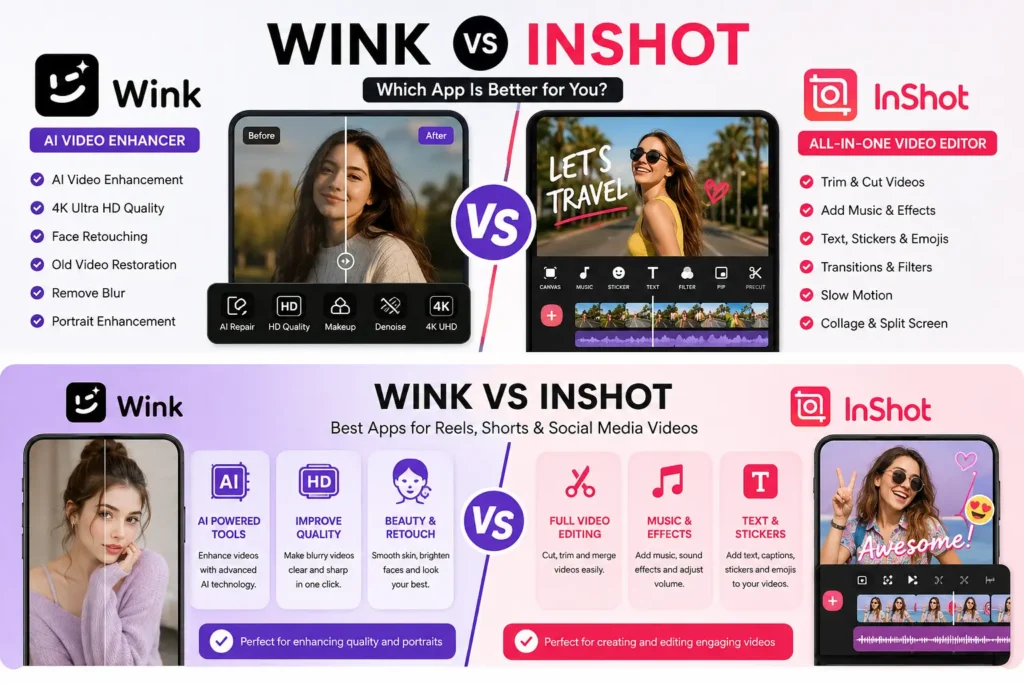
If you want to edit videos on your phone, you may have seen two popular apps: Wink and InShot. Both apps are useful, but they are not made for the exact same purpose. That is why many users search for Wink vs InShot before choosing the best app for their videos, photos, reels, shorts, or social media posts.Wink is mostly known for AI video enhancement, face retouching, photo enhancement, and making videos look clearer. It is a good choice when your video is blurry, low quality, old, or needs a clean beauty-style upgrade. In simple words, Wink is better when you want your video or photo to look more polished with less manual work.
InShot is more like a complete video editing app. It is useful for cutting clips, adding music, writing text on videos, adding transitions, creating reels, making vlogs, and editing videos for TikTok, Instagram, YouTube Shorts, Facebook, and WhatsApp. In simple words, InShot is better when you want more control over the full video editing process.
In this article, we will compare Wink vs InShot in a very simple way. You will learn their features, pros, cons, differences, best uses, and which app is better for your needs.
What Is Wink?
Wink is an AI-powered video and photo editing app. Its main job is to improve the quality of your photos and videos. Many people use Wink when they want to make blurry videos clearer, enhance faces, improve skin tone, restore old videos, or make clips look more HD.
Wink is especially popular among users who want fast results. You do not need to be a professional editor. You can upload a photo or video, choose an AI tool, and let the app improve the content.
Wink is useful for:
- AI video enhancement
- Photo enhancement
- Face retouching
- Old video restoration
- Blur removal
- Beauty filters
- Portrait improvement
- Social media content polishing
Wink is a strong choice for people who want their videos to look clean, bright, sharp, and attractive without spending too much time on manual editing.
What Is InShot?
InShot is a popular mobile video editor and video maker. It gives users many tools to edit videos from start to finish. You can cut clips, merge videos, add songs, add voice-over, use filters, insert stickers, add text, create transitions, change speed, and export videos for social media.
InShot is very popular with content creators because it is simple but powerful. You can use it for Instagram Reels, YouTube Shorts, TikTok videos, vlogs, travel videos, birthday videos, product videos, and daily social media posts.
InShot is useful for:
- Video trimming
- Video cutting
- Adding music
- Adding text
- Adding stickers
- Transitions
- Filters and effects
- Slow motion videos
- Photo slideshow
- Reels and shorts editing
- Basic photo editing
InShot is a better choice when you want to build a complete video with multiple clips, text, audio, effects, and transitions.
Wink vs InShot: Quick Comparison Table
| Feature | Wink | InShot |
|---|---|---|
| Main Use | AI enhancement | Full video editing |
| Best For | Clearer photos and videos | Reels, vlogs, shorts, social videos |
| AI Tools | Strong AI enhancement tools | Some AI editing tools |
| Video Cutting | Basic | Strong |
| Music Editing | Limited compared to InShot | Strong |
| Text on Video | Available | Strong and easy |
| Transitions | Basic | Better |
| Photo Enhancement | Strong | Basic to good |
| Face Retouching | Strong | Limited compared to Wink |
| Beginner Friendly | Yes | Yes |
| Best User | People who want better quality | People who want full editing control |
This table shows the main difference clearly. Wink is better for improving quality. InShot is better for editing and creating videos.
Wink vs InShot for AI Video Enhancement
When we compare Wink vs InShot for AI video enhancement, Wink is the stronger option. Wink is designed to improve video quality using AI. If your video looks blurry, dark, pixelated, or low quality, Wink can help make it look clearer.
For example, if you have an old family video, a low-quality selfie video, or a blurry clip from your phone, Wink can improve it with AI. It can make faces look clearer and videos look more polished.
InShot also has useful editing tools, but its main focus is not only AI enhancement. InShot is more focused on editing videos with music, text, transitions, and effects. So, if your main goal is to improve video quality, Wink is usually the better choice.
Winner for AI video enhancement: Wink
Wink vs InShot for Reels and Shorts
For Instagram Reels, YouTube Shorts, and TikTok videos, InShot is usually better. The reason is simple: short videos need editing tools. You may need to cut clips, add music, add subtitles, insert stickers, use transitions, adjust speed, and export in the right size.
InShot gives you more control for this type of content. You can create a complete short video from beginning to end. You can add trending music, split clips, add captions, use filters, and make the video ready for social media.
Wink can also help with reels and shorts, but it is better used before or after editing. For example, you can first use Wink to improve video quality, then use InShot to add music and text. This workflow can give you a better final result.
Winner for reels and shorts: InShot
Wink vs InShot for Photo Editing
Wink is better for AI photo enhancement, especially if you want to improve face quality, remove blur, or make a photo look sharper. It is useful for selfies, portraits, profile pictures, and social media photos.
InShot also has photo editing features, but it is not mainly a photo enhancer. InShot is better for basic photo editing, collage making, adding stickers, and creating simple social media images.
If your photo is blurry or low quality, Wink is a better choice. If you want to create a collage or add text and stickers to a photo, InShot can be useful.
Winner for photo enhancement: Wink
Winner for basic creative photo editing: InShot
Wink vs InShot for Beginners
Both Wink and InShot are beginner-friendly, but they are easy in different ways.
Wink is easy because most of its features are automatic. You choose a photo or video, apply an AI tool, and wait for the result. This is great for users who do not know much about editing.
InShot is also easy, but it gives more tools. A beginner can learn it quickly, but it may take a little time to understand trimming, transitions, music, text, speed control, and export settings.
If you want one-tap improvement, Wink is easier. If you want to learn basic video editing, InShot is better.
Winner for one-tap editing: Wink
Winner for learning video editing: InShot
Wink vs InShot for Social Media Content
If you are creating content for TikTok, Instagram, YouTube Shorts, or Facebook, InShot is the better all-rounder. It gives you tools to create a complete video. You can cut boring parts, add background music, place text on the screen, add stickers, and create a smooth final video.
Wink is useful when your content needs a quality boost. For example, if your face video looks dull or blurry, Wink can make it look better. But for final editing, InShot gives you more creative control.
A smart content creator can use both apps together. Use Wink first to enhance the video quality. Then use InShot to edit the video, add text, music, and transitions.
Best workflow:
Use Wink for quality and InShot for editing.
Image 2 Suggestion
Image File Name: wink-vs-inshot-social-media-editing.webp
Alt Text: InShot video editor interface for reels, shorts, music, text, and transitions
Caption: InShot is a strong choice for creating reels, shorts, vlogs, and social media videos.
Wink vs InShot for YouTube Videos
For YouTube Shorts, InShot is a very good option. You can edit vertical videos, add music, use text, and make short content quickly. It is also useful for basic YouTube vlog editing.
For long YouTube videos, InShot can still be helpful, but professional editors may prefer desktop software. However, for beginners and mobile creators, InShot is simple and effective.
Wink is useful for improving face videos, old clips, or low-quality footage before uploading to YouTube. If your video quality is poor, Wink can help improve it. But if you need to cut clips, add background music, add title text, and arrange scenes, InShot is better.
Winner for YouTube Shorts editing: InShot
Winner for improving video quality before upload: Wink
Wink vs InShot for Beauty and Face Retouching
Wink is stronger for beauty editing and face retouching. It is designed to improve faces, skin, portraits, and selfie videos. If you want your face to look clearer and smoother, Wink is the better choice.
InShot has filters and effects, but it is not mainly a beauty retouching app. It can improve the overall look of a video, but Wink gives more focus to AI face enhancement.
This makes Wink useful for selfie videos, profile videos, beauty content, makeup videos, and portrait clips.
Winner for beauty and face retouching: Wink
Wink vs InShot for Music and Audio Editing
InShot is much better for music and audio editing. You can add background music, adjust volume, add voice-over, use sound effects, and sync audio with your video.
This is very important for social media videos. A good reel or short video often needs strong audio. Music, voice, and sound effects can make a video more engaging.
Wink is not mainly made for audio editing. Its strength is visual enhancement, not music editing.
Winner for music and audio editing: InShot
Wink vs InShot for Text, Stickers, and Captions
InShot is better for adding text, stickers, emojis, captions, and titles. If you want to create a tutorial, motivational video, product video, or meme-style clip, InShot gives you more useful tools.
Text is very important in short videos because many people watch videos without sound. InShot helps you make your message clear on the screen.
Wink may have some editing options, but it does not beat InShot in text and creative editing tools.
Winner for text and stickers: InShot
Pros and Cons of Wink
Pros of Wink
Wink is easy to use and gives fast results. It is great for AI video enhancement and photo enhancement. It helps improve blurry videos, old videos, and portraits. It is useful for beauty content, selfie videos, and profile photos.
Cons of Wink
Wink is not the best app for full video editing. If you want to cut many clips, add music, use transitions, and create a full social media video, you may feel limited. Some advanced features may also require a paid plan.
Pros and Cons of InShot
Pros of InShot
InShot is a complete mobile video editor. It is great for reels, shorts, vlogs, TikTok videos, Instagram posts, and YouTube content. It has music tools, text tools, stickers, transitions, filters, speed control, and many creative features.
Cons of InShot
InShot is not as strong as Wink for AI video enhancement and face retouching. If your video is very blurry or low quality, InShot may not improve it as well as Wink. Some premium tools may also require payment.
Which App Should You Choose?
Choose Wink if your main goal is to improve video or photo quality. Wink is better for AI enhancement, face retouching, blur removal, portrait improvement, and making old or low-quality videos look better.
Choose InShot if your main goal is to create and edit videos. InShot is better for cutting clips, adding music, adding text, using transitions, making reels, creating shorts, and editing social media content.
Choose both if you want the best result. First, use Wink to enhance your video quality. Then use InShot to edit the video properly with music, text, captions, and effects.
Final Verdict: Wink vs InShot
The final answer depends on your goal.
If you want a simple AI tool that improves video and photo quality, Wink is better. It is perfect for users who want clearer videos, better selfies, smoother portraits, and fast AI enhancement.
If you want a complete mobile video editor, InShot is better. It is perfect for users who want to make reels, shorts, vlogs, TikTok videos, Instagram videos, and YouTube content.
So, in the battle of Wink vs InShot, there is no single winner for everyone. Wink wins for AI enhancement. InShot wins for complete video editing. For the best content, use both together.
FAQs About Wink vs InShot
1. Is Wink better than InShot?
Wink is better for AI video enhancement and photo enhancement. InShot is better for complete video editing, music, text, transitions, and social media videos.
2. Is InShot good for beginners?
Yes, InShot is good for beginners. It has simple tools for cutting videos, adding music, adding text, and making social media content.
3. Is Wink good for video quality improvement?
Yes, Wink is good for improving video quality. It is useful for blurry videos, old videos, and low-quality clips.
4. Which app is better for TikTok videos?
InShot is better for TikTok videos because it gives more editing tools like music, text, stickers, transitions, and speed control.
5. Which app is better for photo enhancement?
Wink is better for photo enhancement because it focuses more on AI improvement, face retouching, and blur removal.
6. Can I use Wink and InShot together?
Yes, you can use both apps together. Use Wink to improve quality, then use InShot to edit the video with music, text, and transitions.
7. Which app is better for Instagram Reels?
InShot is better for Instagram Reels because it gives more tools for short-form video editing.
8. Which app is better for face retouching?
Wink is better for face retouching and beauty-style enhancement.
Conclusion
Wink and InShot are both useful apps, but they are made for different purposes. Wink is best for AI video and photo enhancement. InShot is best for full video editing and social media content creation.
If you only want to make your video clearer, choose Wink. If you want to create a full edited video with music, text, and effects, choose InShot. And if you want the best possible result, use both apps together.
That is the simplest answer to Wink vs InShot: Wink improves quality, while InShot helps you create better videos.